
Define the exact input before encoding
A copied string can look identical while containing different bytes. A final newline, a leading byte-order mark, or a different Unicode representation can change the encoded result. Start with an exact fixture rather than judging by appearance alone.
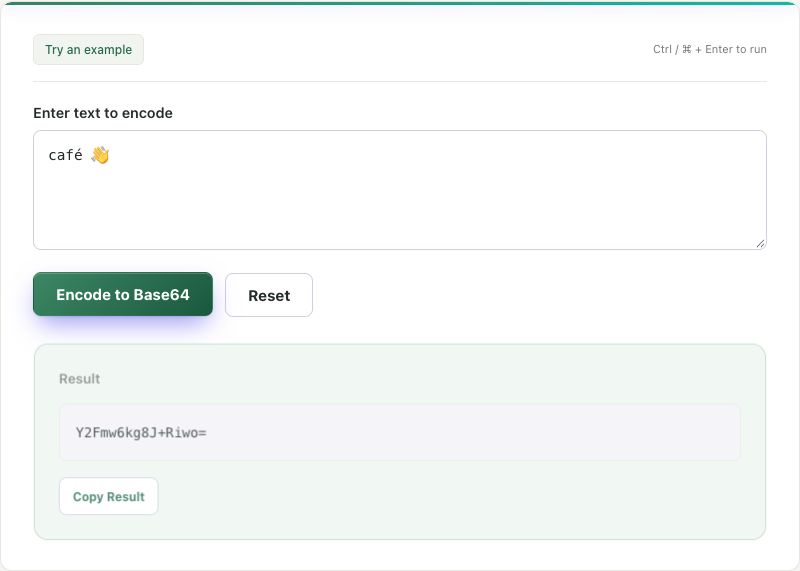
Our UTF-8 input file contains café 👋 followed by one LF newline. Its eleven bytes are: five for café, one space, four for the emoji, and one for LF. The accompanying expected-results file records the text using an explicit \n escape and gives both encoded variants.
This is a fictional public sample. Base64 is reversible; use sample data when testing a workflow that eventually sends the encoded value elsewhere.
Run both directions and compare the result
- Open the text file in a plain-text editor and copy its complete content, including the final newline.
- Paste it into the Base64 Encoder and select Encode to Base64.
- The expected result is
Y2Fmw6kg8J+Riwo=. Copy it into the Base64 Decoder. - Select Decode Base64. The result should contain the accented letter, emoji, space, and final LF.
- Compare with the expected-results file. A visual match of the visible characters alone does not establish that the newline survived.
Expected encoded output:
Y2Fmw6kg8J+Riwo=Now remove only the final LF from the original text and encode again. The expected output changes to:
Y2Fmw6kg8J+Riw==If your first result matches this second value, the final newline was not included. That is an input difference, not evidence that the encoder corrupted the emoji.
Explain the bytes and padding
Standard Base64 converts each group of three bytes into four alphabet characters. Its padded output length is 4 × ceil(byte count ÷ 3). Eleven input bytes produce sixteen output characters with one final =. Removing LF leaves ten bytes and still produces sixteen characters, now with two padding characters.
The tool uses UTF-8 for text. JavaScript string length, visual character count, and UTF-8 byte count are different measurements. For example, the emoji occupies four UTF-8 bytes; counting it as one visible symbol does not make it one byte. Padding describes how the final byte group was encoded, not whether the original text ended with whitespace.
Check the destination before using the output
The + in this sample matters. Standard Base64 uses + and /; Base64url uses - and _ instead. A protocol may also define whether padding is present. ToolSprouts's text encoder produces padded standard Base64. It does not create a signed token or a Base64url JWT segment.
If the destination expects Base64url, use an implementation configured for that protocol. Passing standard output into a URL or form without the correct encoding can change how reserved characters are interpreted. A successful local round trip does not prove that a remote transport accepts the same representation.
Use a failed round trip to narrow the cause
- Different padding or suffix: first check whether spaces, LF, or CRLF changed in the original text.
- Replacement characters or a decoding error: check the byte encoding. Arbitrary binary data is not necessarily valid UTF-8 text; this decoder is for text.
- Unexpected characters after transport: check the alphabet and the destination's URL or form encoding rules.
- Visually identical text but a different encoding: compare Unicode code points and check for a leading byte-order mark. The tools do not normalize Unicode.
For an issue report, share the smallest non-sensitive input, exact encoded output, and which stage changed it. Do not send an authentication token simply because it looks like Base64. The contact page explains how to report a reproducible problem.
References and corrections
These examples describe the stated inputs and checks. They do not establish compatibility with every browser, encoder, or receiving service. Found a different result? Send a reproducible example.