
Start with the change you need to approve
Imagine a staging API returns a revised account configuration. Both responses are valid JSON, but that does not tell you whether a boolean became a string, an ID changed, or a field disappeared. A successful syntax check answers a different question from a change review.
The fictional pair below deliberately includes all three problems and an array reorder. No customer data, credentials, or remote service is involved. Download Original JSON and Updated JSON to repeat the check. Keep them as text: loading large integers into a floating-point number first can destroy the difference you intend to inspect.
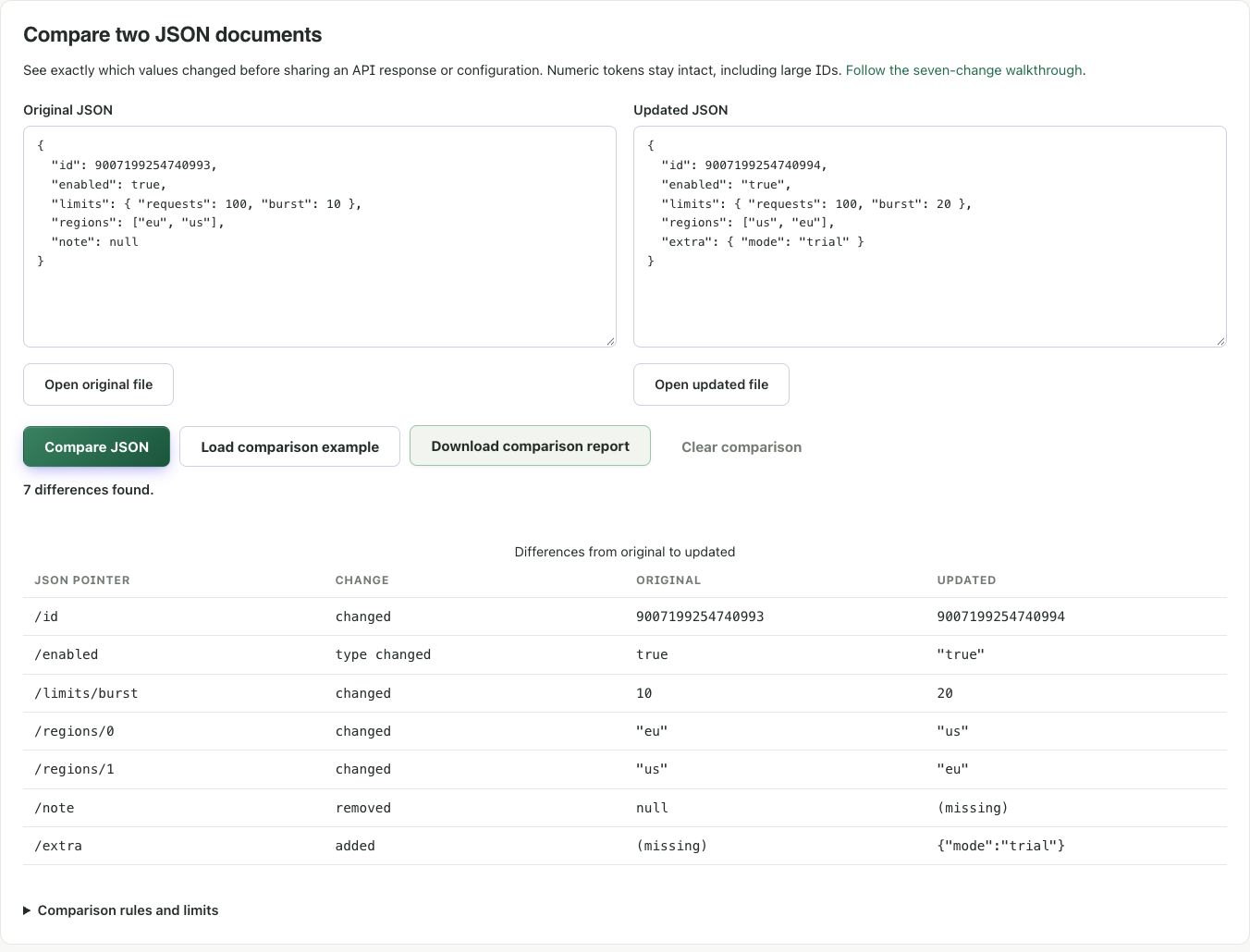
Repeat the seven-change comparison
- Open the JSON comparison section.
- Select Load comparison example, or use Open original file and Open updated file to load the two downloads.
- If you loaded files, select Compare JSON. The sample button runs the comparison itself.
- Expect 7 differences found. Read the path, change category, original value, and updated value together.
- Download the report and compare its
changesarray with the independently specified expected differences.
Original:
{
  "id": 9007199254740993,
  "enabled": true,
  "limits": { "requests": 100, "burst": 10 },
  "regions": ["eu", "us"],
  "note": null
}
Updated:
{
  "id": 9007199254740994,
  "enabled": "true",
  "limits": { "requests": 100, "burst": 20 },
  "regions": ["us", "eu"],
  "extra": { "mode": "trial" }
}
Read the differences as review questions
| Path | Observation | Question to resolve |
|---|---|---|
/id | 9007199254740993 → 9007199254740994 | Does the update refer to the intended record? |
/enabled | Boolean true → string "true" | Does the receiving API expect a boolean? |
/limits/burst | 10 → 20 | Is the higher limit intentional? |
/regions/0 and /regions/1 | Two positional changes | Does the consuming application care about array order? |
/note | null removed | Are omitted and explicitly empty values equivalent for this API? |
/extra | An object added | Is the new field permitted? |
The report identifies differences; it cannot decide which update is correct. The before and after fields in the download contain JSON text stored as strings. This preserves the large ID without making the report reader parse it as a number. A missing side is omitted from the report, while a present JSON null is represented by the text "null".
Know what this comparison treats as equal
Object property order is ignored: {"a":1,"b":2} and {"b":2,"a":1} have no differences. Strings are compared after decoding JSON escapes, so "a" and "\u0061" are equal. Unicode normalization is not applied; visually similar strings can still differ.
Numbers are deliberately compared as exact text. 1, 1.0, and 1e0 are reported as different even though an arithmetic system may treat them as equal. Arrays use positions, not ID-based matching: inserting one item at the start can produce many differences. For a meaningful review, align records deliberately in your own workflow; the tool does not silently sort or match them.
Paths follow JSON Pointer: /items/0 means the first array item, /a~1b identifies a property named a/b, and /m~0n identifies m~n. The empty path represents the whole document and is displayed as (root).
Finish the review without overstating the result
Duplicate property names stop the comparison, including duplicates written using different escape sequences. Resolve those first; a path cannot say which repeated property you meant. Invalid syntax reports the document side and its first error. Each input supports up to 1 MiB of UTF-8, 50,000 values, and 100 nesting levels.
More than 500 differences produces a clearly marked partial result. The download is partial too. Split a large review into smaller documents rather than treating the displayed subset as a complete change list. The report is descriptive and cannot be applied as a JSON Patch.
Before sharing, review the exported values for private data. Local processing does not remove secrets from a report you send to someone else. Finally, validate the intended schema and business rules in the receiving application. Seven detected changes are evidence of what differs, not approval of the release.
References and corrections
- RFC 6901 — JSON Pointer syntax and escaping
- RFC 8259 — object names, strings, and number interoperability
These examples describe the stated inputs and checks. They do not establish compatibility with every browser, encoder, or receiving service. Found a different result? Send a reproducible example.
Continue with another task
Format JSON without changing large numeric IDs
Make an API response readable while keeping the exact number text you received.
Read walkthrough DeveloperFix JSON errors one correction at a time
Use the detected location to repair a document without guessing at changes to its data.
Read walkthrough