
Why a readable response can lose an ID
Suppose a support ticket contains an API response with an ID of 9007199254740993. You want to indent it before comparing it with a log. A formatter that first converts the number into a JavaScript Number can lose precision before it writes the response back out. Formatting should not change which record the ticket refers to.
ToolSprouts keeps the original numeric tokens during formatting. That is useful when your immediate task is inspecting or sharing the original text, rather than performing arithmetic on its numbers.
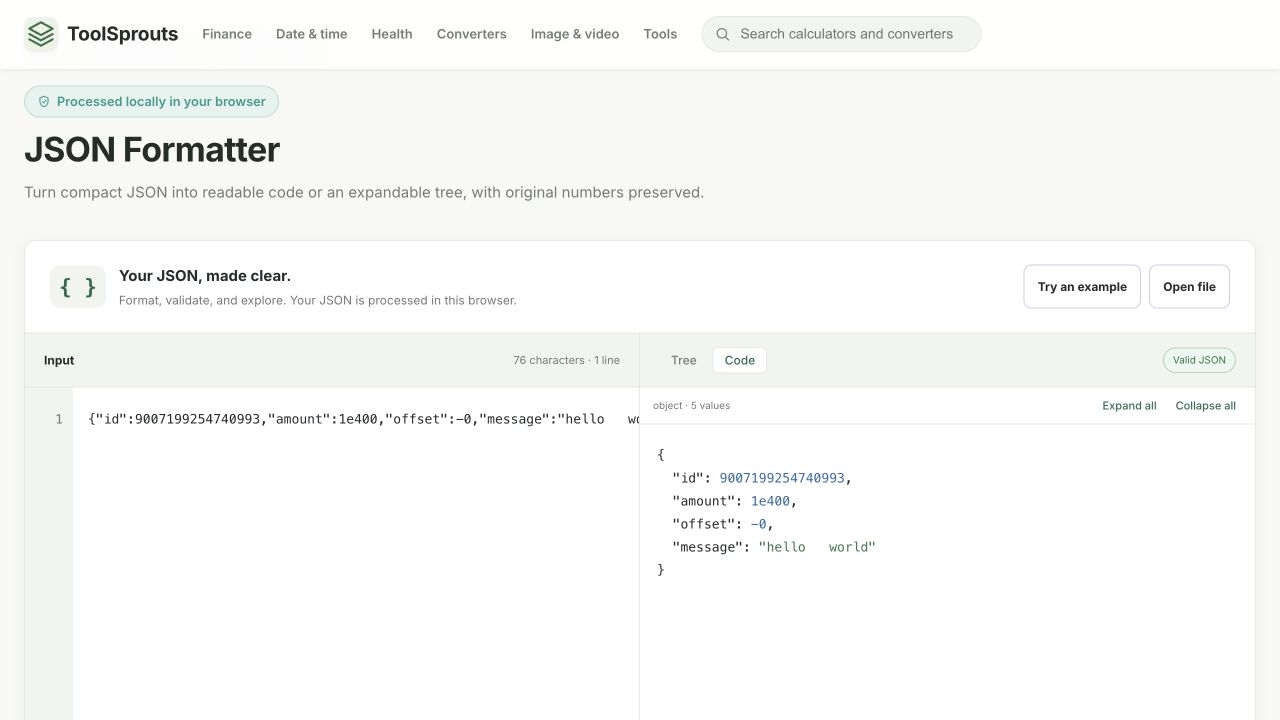
Run the preservation check
- Open the JSON Formatter and paste the input below.
- Choose 2 spaces and select Format JSON.
- Select Code. Compare every numeric token with the input.
- Select Minify if you need compact text. Check that the three spaces inside the message remain.
- Use Copy JSON or Download for the result. Verify the receiving application's number handling separately.
Input:
{"id":9007199254740993,"amount":1e400,"offset":-0,"message":"hello world"}Expected formatted output, also observed in the browser:
{
  "id": 9007199254740993,
  "amount": 1e400,
  "offset": -0,
  "message": "hello   world"
}
The deliberately extreme 1e400 tests text preservation. It is not a recommendation for interoperable application data: many receiving systems cannot represent it as a finite number.
Preservation does not resolve duplicate keys
Try {"role":"reader","role":"editor"}. Both properties remain in the output, and the tool displays a duplicate-property notice. This avoids silently choosing a role for you, but the document still needs a decision: remove the unintended entry before sending it to an API. Some receivers keep only one value.
Likewise, retaining -0 or an exponent does not mean another program will retain its spelling or meaning. Treat the formatted file as a faithful text transformation, not a guarantee about a later import.
Before sharing the result
- Compare a large identifier digit by digit with the original.
- Inspect duplicate-property notices instead of treating a valid status as an application approval.
- Check that only whitespace outside strings changed.
- Remove credentials and personal records before sharing a sample with someone else.
The editor processes input locally and accepts up to 1 MiB, 50,000 values, and 100 nesting levels. A limit message is different from a syntax error. If your task is repairing broken input, use the JSON error walkthrough.
References and corrections
These examples describe the stated inputs and checks. They do not establish compatibility with every browser, encoder, or receiving service. Found a different result? Send a reproducible example.
Continue with another task
Fix JSON errors one correction at a time
Use the detected location to repair a document without guessing at changes to its data.
Read walkthrough DeveloperCompare API responses without losing IDs or type changes
Review a configuration or API change using exact numeric tokens and a path-by-path report, rather than a visual scan of two formatted documents.
Read walkthrough